Managing Container Inspection Photos from External Contractors
Internal teams can follow one structured inspection workflow. External repair companies, surveyors, hauliers, and partner depots usually cannot. Their photos arrive through whatever channel is already available — leaving operations teams to turn disconnected email attachments into reliable container damage and repair evidence.
Why External Inspection Photos Follow a Different Path
The operational divide is simple: internal employees can be trained on one inspection process, but external companies serve multiple customers and bring their own devices, policies, and systems. A haulier may photograph a handover on a phone. A surveyor may create a report in specialist software. A repair vendor may send progress photos through Outlook. A small sub-depot may rely on Gmail or WhatsApp.
Email becomes the lowest common denominator. It crosses organisational boundaries without requiring shared tenant access, another login, or another app. That makes email useful for transport — but not automatically suitable for organising, retaining, or retrieving inspection evidence.
Internal staff and external contributors do not share the same training, devices, or software
Many contractors are reluctant to adopt customer-specific applications when they serve multiple principals
Existing inspection systems may create reports without providing access to the underlying photo archive
Email succeeds as a universal handoff channel precisely because it requires so little coordination
WORKFLOW FRAGMENTATION
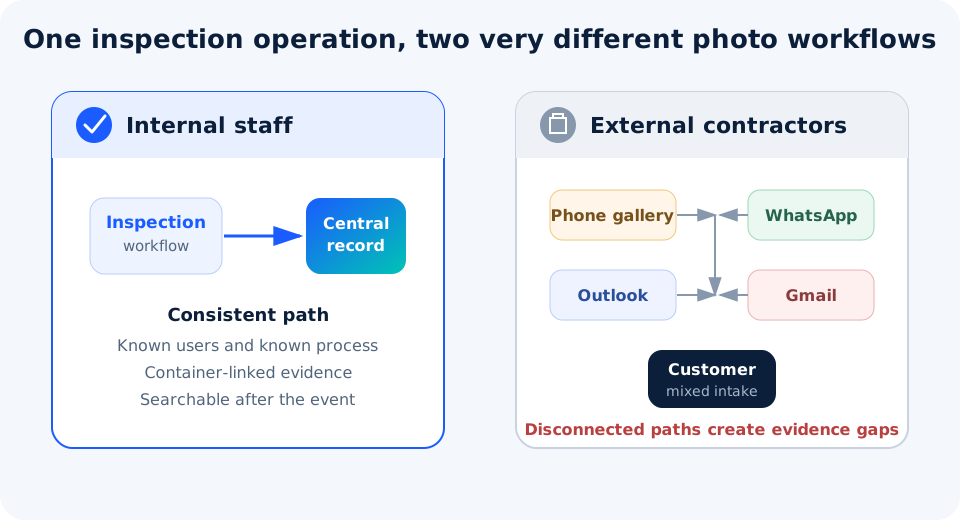
One Operation, Two Evidence Paths
The gap starts before any attachment reaches the inbox: internal staff follow a controlled workflow while external contributors use several disconnected channels.
The same container operation can produce both structured internal records and unstructured external submissions.
Why Shared Mailboxes Become Evidence Bottlenecks
A shared mailbox solves visibility better than a personal inbox, but it still organises information around messages rather than containers. For many container operations that rely on external contractors or suppliers, inbound volume can climb quickly — multiple contributors, several inspection stages, and several attachments per message. As that volume grows, the weak points compound.
Problems at intake
subject
Inconsistent subjects or missing container numbers
image
Camera filenames such as IM20260713113116.jpg with no operational meaning
attach_file
Large attachments, mixed file types, and multiple containers in one message
forward
Duplicate forwarding that creates several uncontrolled copies
Problems after the event
person
Evidence remains in personal or team mailboxes
search_off
Retrieval depends on remembering sender, date, and wording
history
No single chronological history across internal and external photos
gavel
Repair disputes expose missing or incomplete evidence weeks later
The Retrieval Test Comes Later
Inspection evidence is rarely tested on the day it is created. The real test comes when a repair invoice, off-hire charge, customer complaint, or insurance request arrives weeks or months later. At that point, “the photos were emailed” is not enough. The organisation must identify the correct container, reconstruct the documented sequence, confirm the relevant photo set, and produce it quickly.
This is why a folder full of images and a container photo archive are not the same thing. An archive must preserve association, context, chronology, access, and retrieval — the same principles covered in container damage documentation best practices.
EVIDENCE RETRIEVAL
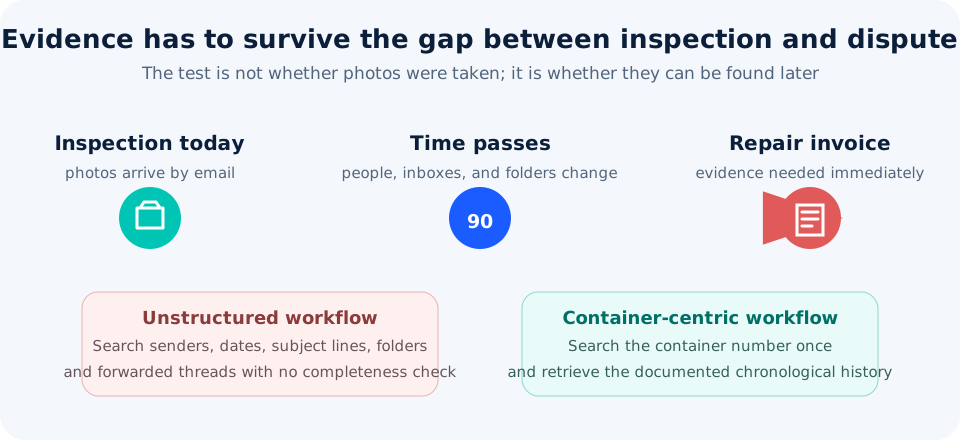
Inspection Today, Dispute 90 Days Later
The delay between capture and challenge turns small filing weaknesses into operational risk.
The operational requirement is not merely to receive photos; it is to retrieve the right documented history when it matters.
What a Modern Contractor Photo Workflow Should Achieve
For many container operations, the practical approach is not to force every external party into the same capture tool. Instead, evidence is standardised after it crosses the organisational boundary and organised around the container rather than the communication channel.
tag
Container-centric organisation
Use the validated ISO 6346 container number as the primary retrieval key instead of sender, folder, or filename.
inventory_2
One searchable archive
Bring internal and external inspection evidence into one controlled location with consistent access and retention rules.
history
Chronological history
Preserve the documented sequence across gate, repair, cleaning, survey, pickup, return, and handover events.
badge
Source traceability
Retain who supplied the evidence and when it entered the workflow instead of losing context during forwarding.
rule
Filename and intake standards
Apply consistent naming and reject or review submissions that cannot be associated with the correct container.
photo_size_select_large
Attachment size and format policy
Define accepted image formats and size limits. Normalise files only where the chosen workflow explicitly supports it.
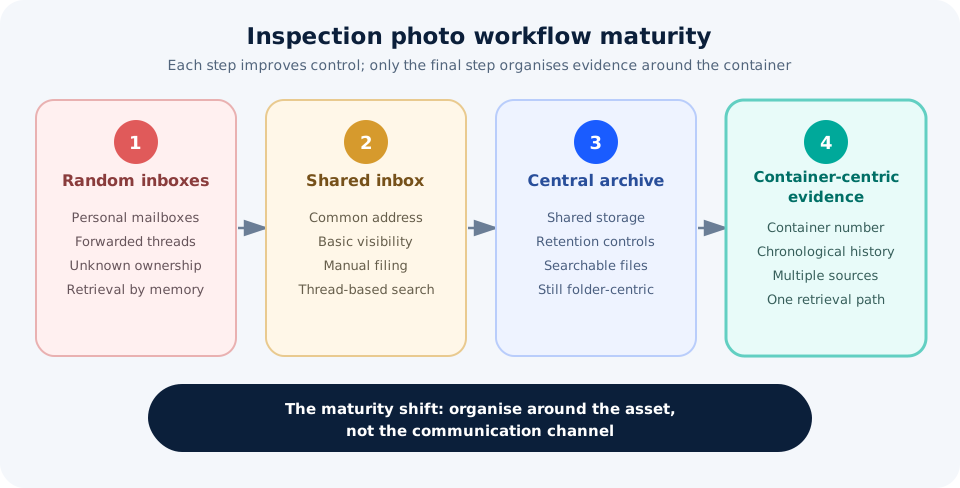
Operational principle: Email can remain the handoff channel for external parties. It should not remain the archive. The mature workflow separates easy submission from controlled evidence management.
A shared mailbox is an improvement over personal inboxes, but it is an intermediate control — not the final evidence model.
Operational maturity increases when evidence is organised around the container and its documented history rather than the channel used to send it. Email can remain useful as intake — it should not remain the archive.
ONE PRACTICAL IMPLEMENTATION
Where ConPDS Checker Email Dropbox Fits
ConPDS Checker includes an Email Dropbox capability for organisations that already use ConPDS Checker internally but receive inspection photos from external contractors by email. It ingests image attachments into the same inspection platform used by mobile app users, associates submissions with the container record, and makes the combined evidence available through one backoffice workflow.
That is the implementation layer, not the subject of this guide. Continue to the Email Dropbox page for mailbox setup, parsing rules, backoffice filing, contractor instructions, and known limitations.
CONTINUE TO IMPLEMENTATION
See How External Email Photos Join the Checker Archive
If the operational problem described here matches your contractor workflow, continue to the focused Email Dropbox page for implementation details, supported intake rules, and the backoffice result.
Who should own the external contractor photo intake policy?▼
Operational ownership should sit with the team accountable for inspection evidence — commonly depot operations, equipment control, or claims — while IT administers mailbox security and access. The owner defines the required container number, accepted formats, inspection context, exception handling, and retention policy.
How long should external contractor inspection photos be retained?▼
Retention should follow contractual, claims, customer, insurance, and regulatory obligations rather than the mailbox's default deletion policy. External photos should inherit the same governed retention rules as internal records for the same event.
What should happen when a contractor omits or mistypes the container number?▼
The submission should enter an exception queue for review rather than being guessed, silently discarded, or filed under an unvalidated identifier. The policy should define who resolves exceptions and how corrections are recorded.
How should source traceability be preserved for emailed inspection photos?▼
Retain the sender, intake time, source channel, associated container number, and relevant inspection context. Forwarding attachments into new messages or saving them without source information weakens traceability.
Can email remain the contractor intake channel without becoming the archive?▼
Yes. Email can remain the low-friction handoff channel while a separate evidence workflow validates the container association, retains source context, and stores photos in a governed, container-centric archive. Submission convenience and evidence management are separate requirements.
Continue Reading
These guides answer adjacent questions once the contractor-intake problem is clear.
Still choosing an intake channel?
Compare email threads, WhatsApp, shared folders, and structured evidence workflows before you standardise contractor submissions.