Bring External Inspection Photos Into Your Existing ConPDS Checker Workflow
Most ConPDS customers already run inspections through the ConPDS Checker mobile app — immediate upload, container-linked, searchable from backoffice, ready for dispatch. The challenge starts when subcontractors, hauliers, and repair vendors perform inspections on their own phones and send photos by email, WhatsApp, or proprietary apps. Email Dropbox extends the same platform so external parties contribute without installing software.
No obligations — reply within 1 business day
The ConPDS Checker Workflow Your Team Already Runs
Internal staff capture inspection photos in the ConPDS Checker mobile app. Each image uploads immediately, links to an ISO 6346-validated container number at capture, and lands in the searchable archive before anyone returns to the office. Backoffice reviews the set, dispatches to shipping lines, customers, or integrations, and retrieves the full history by container number when a dispute arrives weeks later. This is the fastest workflow ConPDS supports — and it remains the primary path.
01
ConPDS Checker App
02
Immediate upload
03
Backoffice review
04
Dispatch
Container number recognised and validated at capture — not renamed manually afterward
Photos searchable by container number the moment upload completes
Fastest path from field capture to backoffice dispatch
PLATFORM MODEL
One Evidence Platform · Two Ways to Contribute
Email Dropbox is not a separate product or an alternative to the mobile app. It is how external contributors join the archive your internal team already builds with Checker.
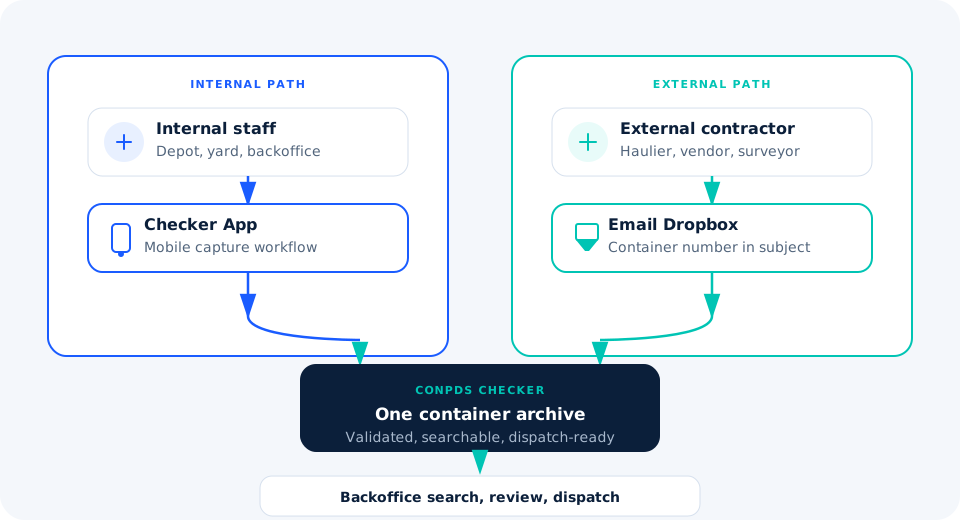
Internal app capture and external email intake produce the same container-linked record in backoffice.
When External Parties Perform the Inspection
You do not control how subcontractors, hauliers, sub-depots, or repair vendors work. They use their own phones, their own inspection software, WhatsApp groups, and personal or shared mailboxes. Photos still arrive — but they land outside your Checker workflow.
Typical external scenarios
Subcontractors completing gate or yard inspections off your payroll
Hauliers photographing condition at pickup or delivery
Partner depots sending repair or wash documentation
Repair vendors returning pre/post-work images by email
What breaks in the inbox
subject
Inconsistent subject lines — missing or partial container numbers
image
Random filenames — IMG_4521, damage_final(2).jpg, scan001
storage
Oversized attachments that choke shared mailboxes and local downloads
inbox
Personal and shared inboxes — no link to the container record in Checker
search_off
Difficult retrieval when the claims desk searches by container number months later
Operational cost: Coordinators manually save, rename, and forward hundreds of attachments per day. When a repair invoice arrives weeks later, reconstructing which thread held which unit can take hours — in line with industry analyses of manual claims handling (Marcura, Voyager Portal), where a single disputed charge routinely costs three or more hours of skilled staff time. Email Dropbox removes that sorting step without asking external senders to adopt your app.
WORKFLOW COMPARISON
Internal App Path vs External Email Path
Both routes converge on the same ConPDS Checker platform and the same backoffice review — only the intake channel differs.
Email Dropbox bridges external senders into the workflow your internal team already runs.
Email Dropbox — External Photos, Same Archive
Contractors email photos to a dedicated dropbox address with the container number in the subject line. ConPDS Checker handles the rest — the same validation, naming, and filing rules your mobile captures already follow.
Identifies the container number from the subject line (and supporting parse rules)
Validates owner code, serial number, and check digit against ISO 6346
Extracts attachments from the message — including multi-image sets
Rotates images when required and optimises resolution for archive and dispatch
Renames consistently and stores under the correct container record
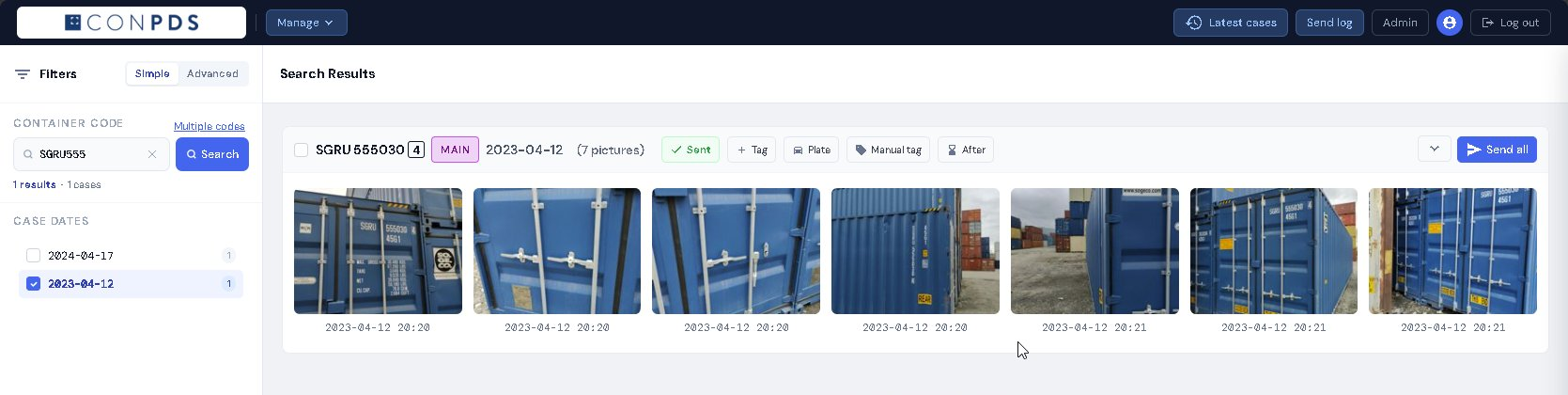
Makes the set immediately searchable alongside app-captured inspections
Indistinguishable in backoffice: Once processed, email-sourced inspections sit in the same container timeline as mobile app captures. Review, dispatch, and retrieval work identically — your team does not maintain a separate “email folder” workflow. Distribution follows the same Checker photo distribution and portal rules configured for your tenant. Tenant admins configure dropbox mailboxes and mail rules in the Checker Help Center mail ingestion guide.
AUTOMATIC PROCESSING
From Inbox Attachment to Container-Linked Record
Every step runs automatically — coordinators no longer rename and sort attachments by hand.
Shared Inbox vs Container Timeline
Email Dropbox replaces inbox archaeology with search by container number.
Operational Benefits for Teams Already on Checker
groups
No software for contractors
External parties keep emailing photos. You extend Checker to receive them — not replace your internal app rollout.
sync_alt
Existing workflows preserved
Hauliers and subcontractors do not install an app or log into a portal. The subject line carries the container number they already know.
speed
Faster backoffice processing
Attachments file themselves container-linked. Review and dispatch start immediately — not after manual inbox sorting.
folder_special
Consistent archive
App captures and email submissions share one naming standard, one timeline, one retrieval path per container number.
gavel
Better dispute documentation
When a repair or off-hire charge arrives, the full external and internal photo set is retrievable in seconds — not reconstructed from threads.
photo_size_select_small
Lower storage footprint
Automatic image optimisation reduces oversized phone-camera attachments before they enter the archive and dispatch pipeline.
Frequently Asked Questions About Email Dropbox
Do external contractors need ConPDS Checker?▼
No. Email Dropbox is for parties who will not install the mobile app. They email photos with the container number in the subject. Your internal team continues using the Checker app as the primary workflow.
Can contractors continue using email?▼
Yes — that is the design. Attach photos, send to the dropbox address, include the container number in the subject. No portal, no app, no behaviour change for external senders.
What happens if the container number is invalid?▼
ISO 6346 check-digit validation runs before filing. Invalid numbers are flagged for admin review instead of silently landing under the wrong container record.
Are large images optimised automatically?▼
Yes. The pipeline rotates when needed, optimises resolution, and applies consistent naming — reducing storage load and keeping attachments manageable for review and dispatch.
How quickly do photos become available?▼
Within minutes of intake — processed email photos appear in the same container timeline as app captures, searchable from backoffice without manual filing.
Can photos from multiple contractors end up under the same container?▼
Yes. Every sender using the same validated container number contributes to one evidence record — internal app photos and external email photos in a single timeline.
Related Resources
Email Dropbox closes the external-contributor gap. These pages cover adjacent sharing, EIR, and dispute workflows on the same Checker archive.
ConPDS Checker
The primary mobile evidence workflow — container number recognition, immediate upload, backoffice review, and dispatch.
Already Using Checker Internally? Add Email Dropbox for Everyone Else
Your mobile workflow is in place. Email Dropbox is the missing piece for subcontractors, hauliers, and repair vendors who will never install the app — bringing their inspections into the same searchable archive your backoffice already relies on.
Without Email Dropbox on an Active Checker Tenant
✗Two evidence silos: App captures in Checker; contractor photos trapped in email threads.
✗Coordinator bottleneck: Manual download, rename, and forward for every external attachment.
✗Incomplete container timelines: Dispute desks see internal photos but not the subcontractor set.
✗Oversized attachments: Phone-camera files bloat storage and slow review without automatic optimisation.